Designing with the user in mind…
View final prototype
How might we?
The Solution
How might we make it easier for users to collaboratively plan and save so that we can reduce the stress and frustration of trip planning.
A trip planning app that works both as an organizer and as a way to save money, it prioritizes group trips by allowing you to collaborate on planning trips and saving towards a collective goal.
Alyssa Diaz
Alyssa Diaz

Bio
Goals
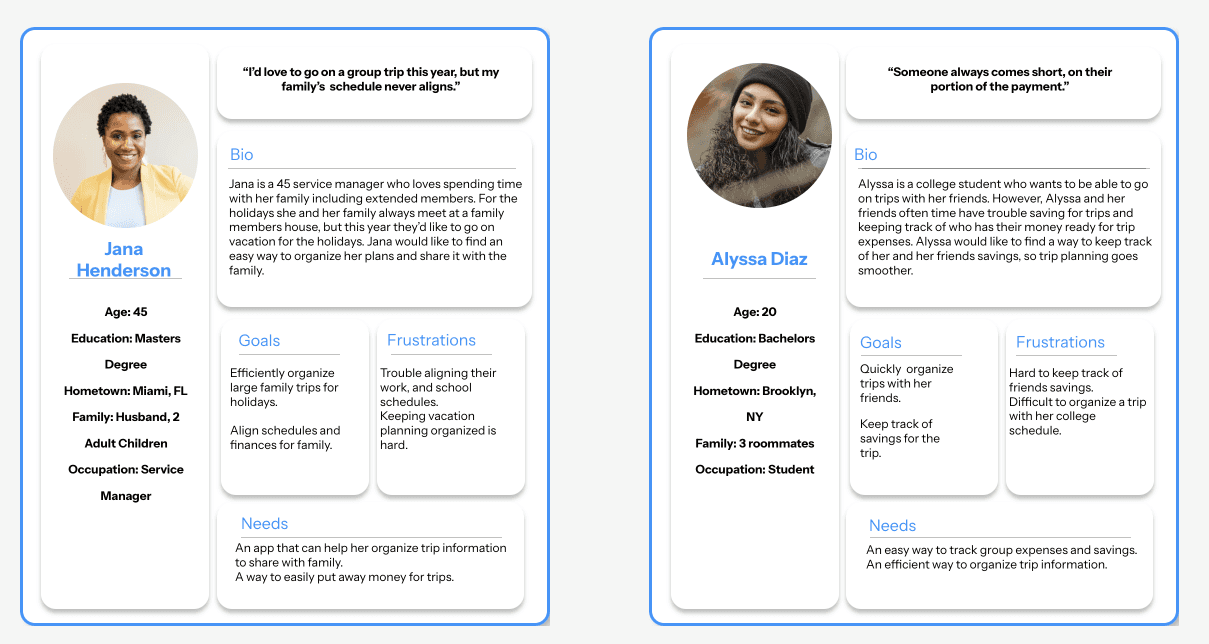
Quickly organize trips with her friends.
Keep track of savings for the trip.
Needs
Frustrations
Age: 20
Education: Bachelors Degree
Hometown: Brooklyn, NY
Family: 3 roommates
Occupation: Student
Hard to keep track of friends savings.
Difficult to organize a trip with her college schedule.
An easy way to track group expenses and savings.
An efficient way to organize trip information.
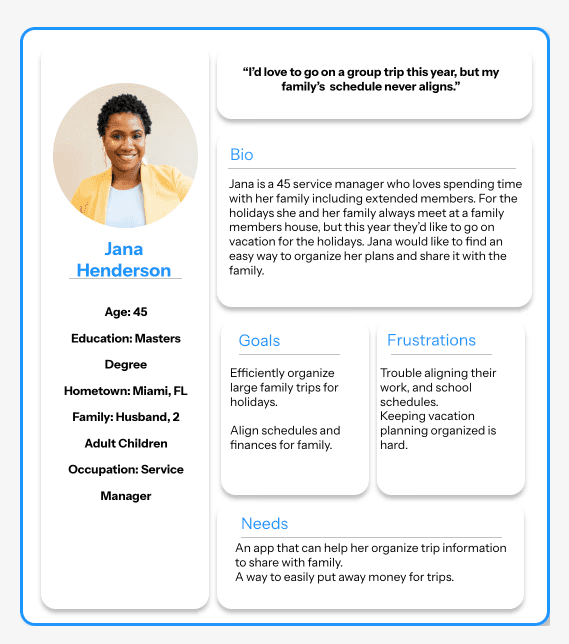
Alyssa is a college student who wants to be able to go on trips with her friends. However, Alyssa and her friends often time have trouble saving for trips and keeping track of who has their money ready for trip expenses. Alyssa would like to find a way to keep track of her and her friends savings, so trip planning goes smoother.
“Someone always comes short, on their portion of the payment.”
Crew'd
Crew'd
Crew'd
Efficiently organize large family trips for holidays.
Align schedules and finances for family.
Bio
Age: 45
Education: Masters Degree
Hometown: Miami, FL
Family: Husband, 2 Adult Children
Occupation: Service Manager
Jana Henderson

Jana is a 45 service manager who loves spending time with her family including extended members. For the holidays she and her family always meet at a family members house, but this year they’d like to go on vacation for the holidays. Jana would like to find an easy way to organize her plans and share it with the family.
Goals
Frustrations
Needs
Trouble aligning their work, and school schedules.
Keeping vacation planning organized is hard.
An app that can help her organize trip information to share with family.
A way to easily put away money for trips.
“I’d love to go on a group trip this year, but my family’s schedule never aligns.”
Skills
Timeline
Role
8 Weeks
Mobile App Design
Digital Design
User Research
UX Designer
UX Researcher
Project Overview
Project Overview
Project Overview
View final prototype
Next steps
Lessons learned
I plan to continue refining the design and conducting more testing to uncover potential pain points in the user flow. This will help me better understand what makes a truly effective and intuitive user interaction.
This process was extremely rewarding and taught me a lot about the design process. As I iterated, I changed my design many times, which helped me realize that less is more. I also learned that good design isn’t just about aesthetics; it’s about functionality and creating a thoughtful, seamless user experience.
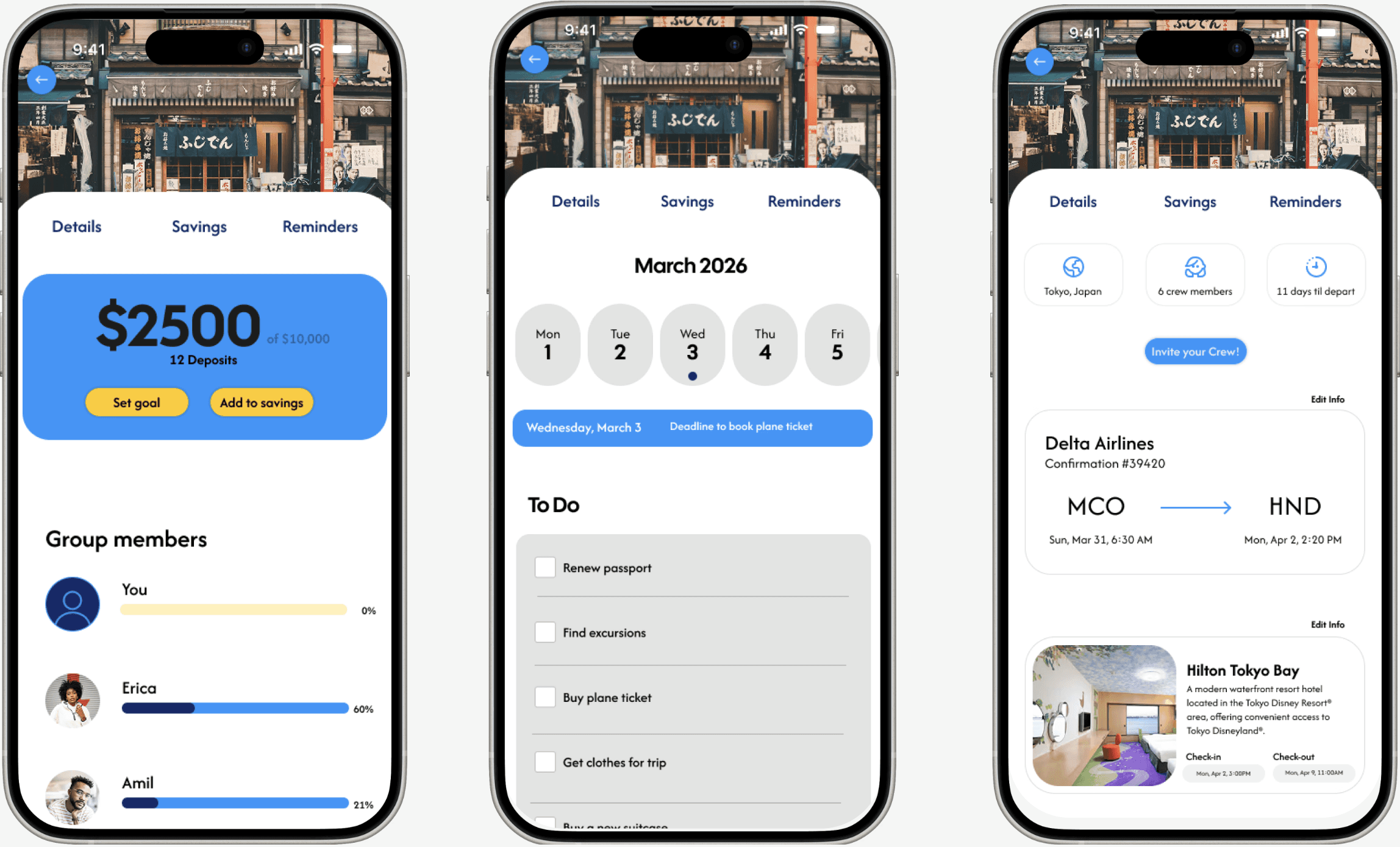
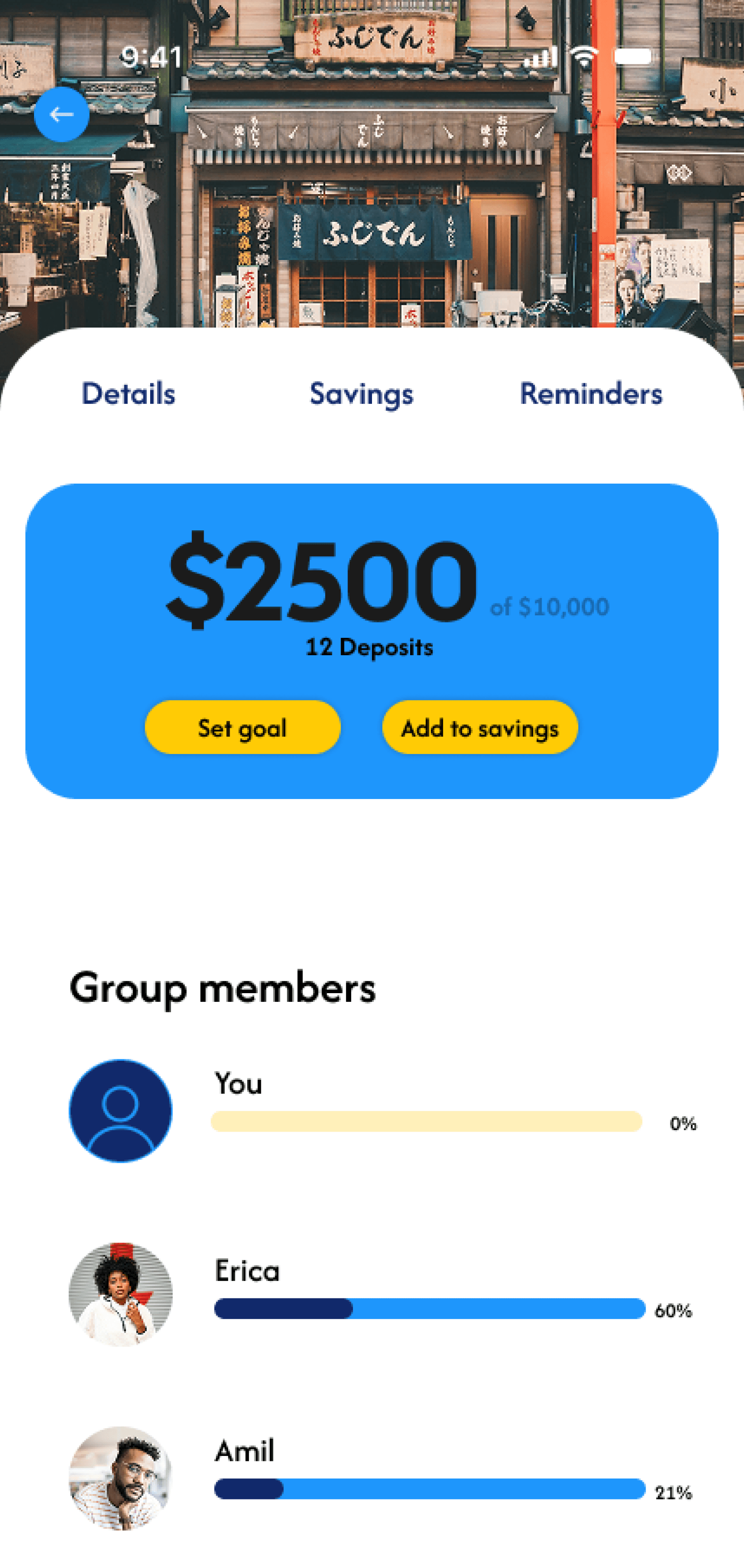
Crew’d is a collaborative trip planning and savings app designed to simplify the group travel experience. The app allows users to create shared savings goals with their travel crew, track individual contributions, and stay accountable as a group.
Beyond budgeting, Crew’d centralizes key trip details in one place by organizing trip details, deadlines, and to-do lists—so nothing gets overlooked. By combining financial planning with trip coordination, Crew’d reduces the stress of group travel and helps users stay aligned, organized, and on track from the early planning stages to departure.
Crew’d is a collaborative trip planning and savings app designed to simplify the group travel experience. The app allows users to create shared savings goals with their travel crew, track individual contributions, and stay accountable as a group.
Beyond budgeting, Crew’d centralizes key trip details in one place by organizing trip details, deadlines, and to-do lists—so nothing gets overlooked. By combining financial planning with trip coordination, Crew’d reduces the stress of group travel and helps users stay aligned, organized, and on track from the early planning stages to departure.
Finances
Time
Planning
Finding an affordable location, and booking everything is especially difficult. It's also hard to keep everyone updated and organized during trip planning.
Saving and organizing savings in a group can be frustrating and confusing. It’s hard to keep track of expenses and the contributions everyone should make.
Finding time to plan and go on vacation was difficult. Especially in a large group where there are so many different schedules.
User Personas
User Persona
User Personas
Think
Action
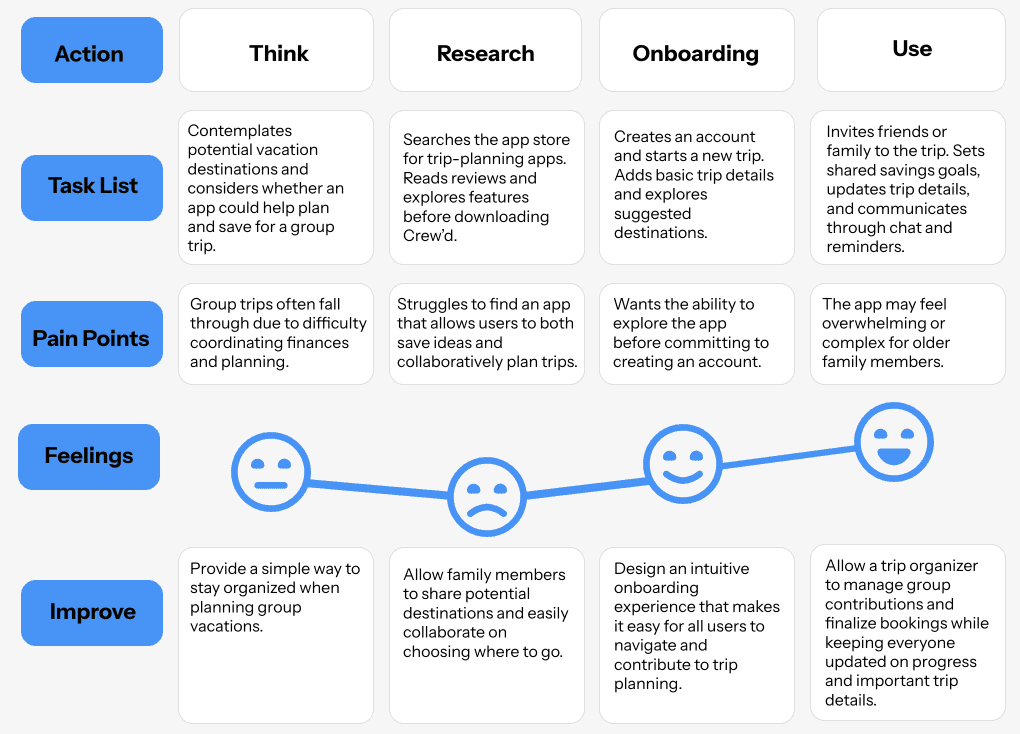
Contemplates potential vacation destinations and considers whether an app could help plan and save for a group trip.
Provide a simple way to stay organized when planning group vacations.
Allow family members to share potential destinations and easily collaborate on choosing where to go.
Design an intuitive onboarding experience that makes it easy for all users to navigate and contribute to trip planning.
Allow a trip organizer to manage group contributions and finalize bookings while keeping everyone updated on progress and important trip details.
The app may feel overwhelming or complex for older family members.
Wants the ability to explore the app before committing to creating an account.
Struggles to find an app that allows users to both save ideas and collaboratively plan trips.
Searches the app store for trip-planning apps. Reads reviews and explores features before downloading Crew’d.
Feelings
Improve
Pain Points
Task List
Creates an account and starts a new trip. Adds basic trip details and explores suggested destinations.
Invites friends or family to the trip. Sets shared savings goals, updates trip details, and communicates through chat and reminders.
Onboarding
Research
Use
Group trips often fall through due to difficulty coordinating finances and planning.
Low-Fidelity Prototypes
Low-Fidelity Prototypes
Low-Fidelity Prototypes
Usability Testing
Usability Testing
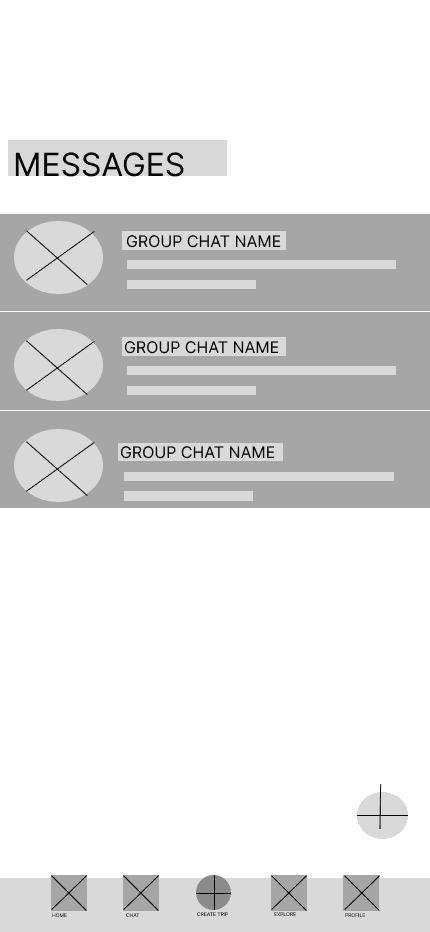
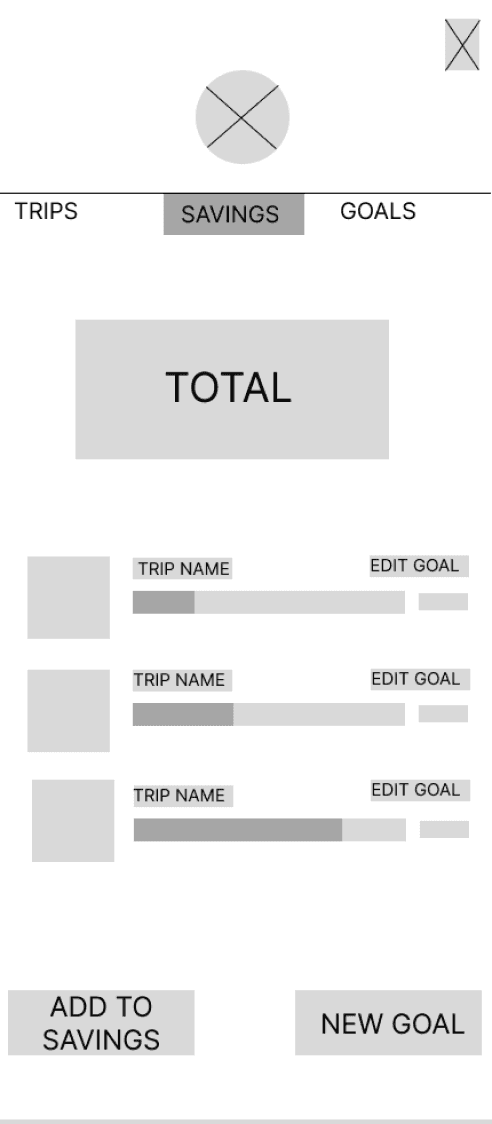
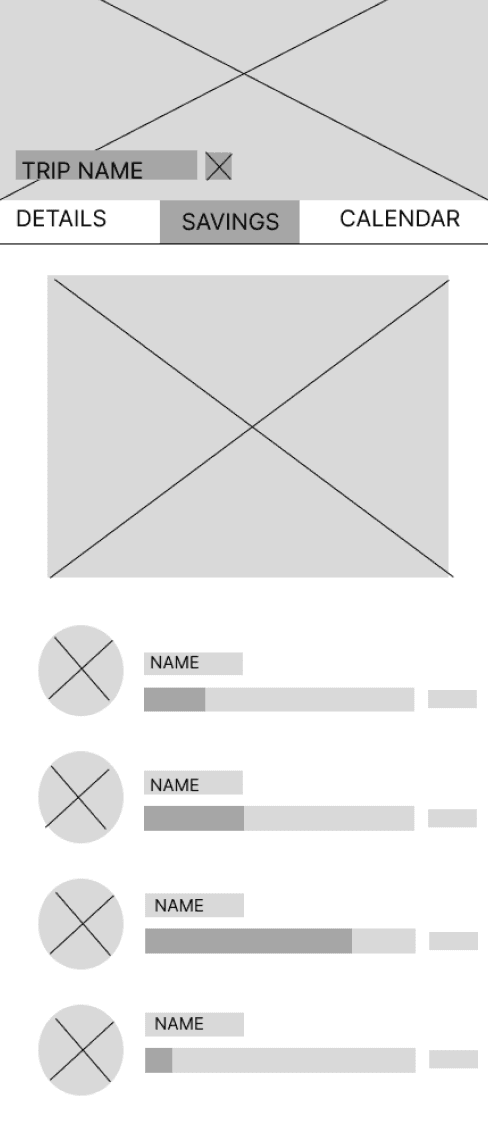
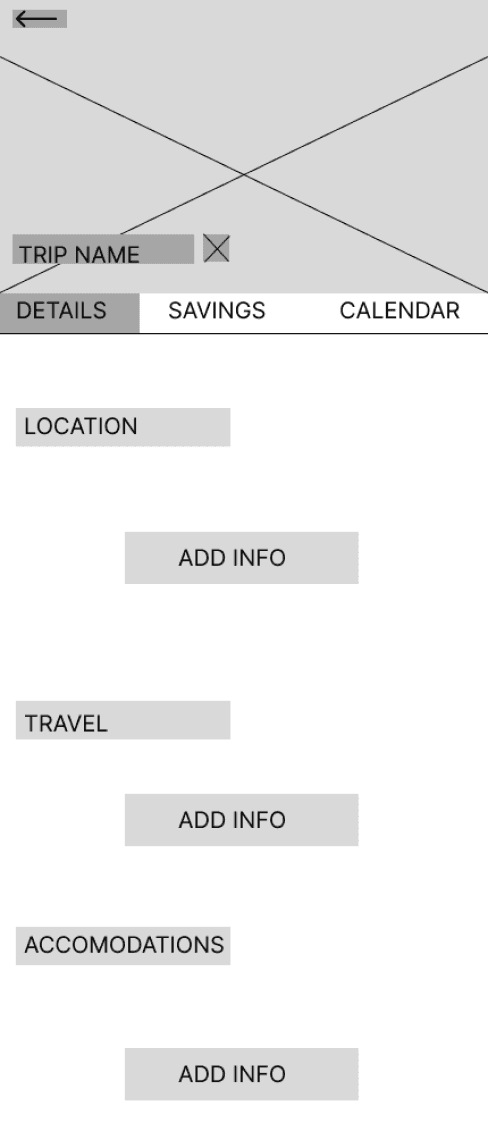
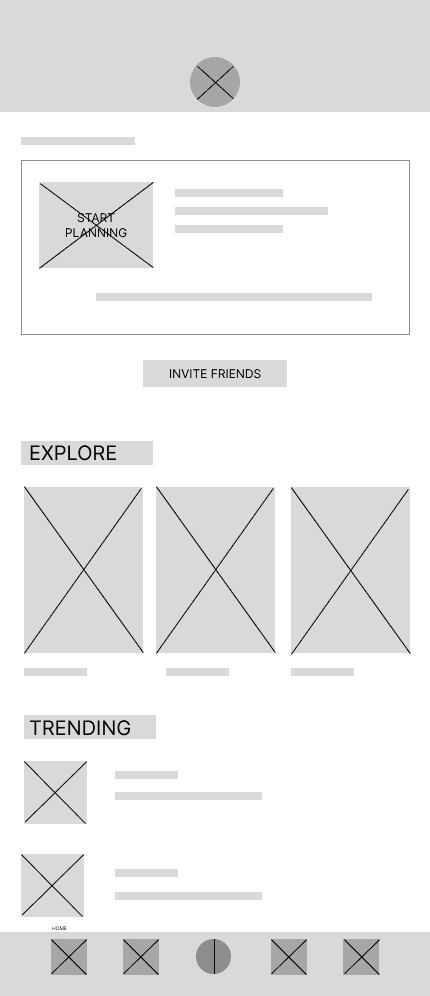
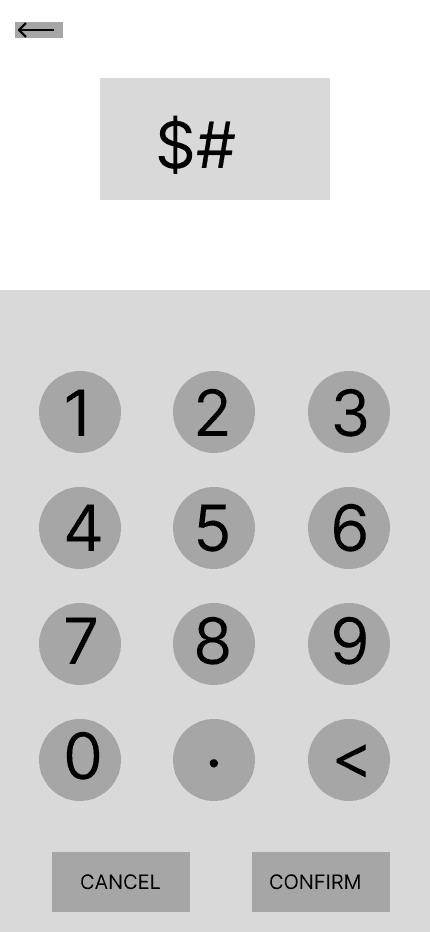
I conducted usability testing during the low-fidelity prototype stage to focus on validating the app’s user flow. Given the number of pages and features, ensuring a clear and intuitive flow was a priority. Testing at this stage allowed me to identify navigation and flow issues early, making the design process more time-efficient before moving into high-fidelity designs.
I interviewed 5 people, giving them a set of tasks to complete. With their feedback I identified 3 common themes that users struggled with:
I conducted usability testing during the low-fidelity prototype stage to focus on validating the app’s user flow. Given the number of pages and features, ensuring a clear and intuitive flow was a priority. Testing at this stage allowed me to identify navigation and flow issues early, making the design process more time-efficient before moving into high-fidelity designs.
I interviewed 5 people, giving them a set of tasks to complete. With their feedback I identified 3 common themes that users struggled with:
Had difficulty locating the personal savings page, suggesting that personal and group savings pathways lack clear visibility and distinction.
Identified the interface as buggy, indicating friction points within the core user flow.
Struggled with overall navigation, revealing usability issues in the app’s information architecture.
80%
40%
80%
Findings
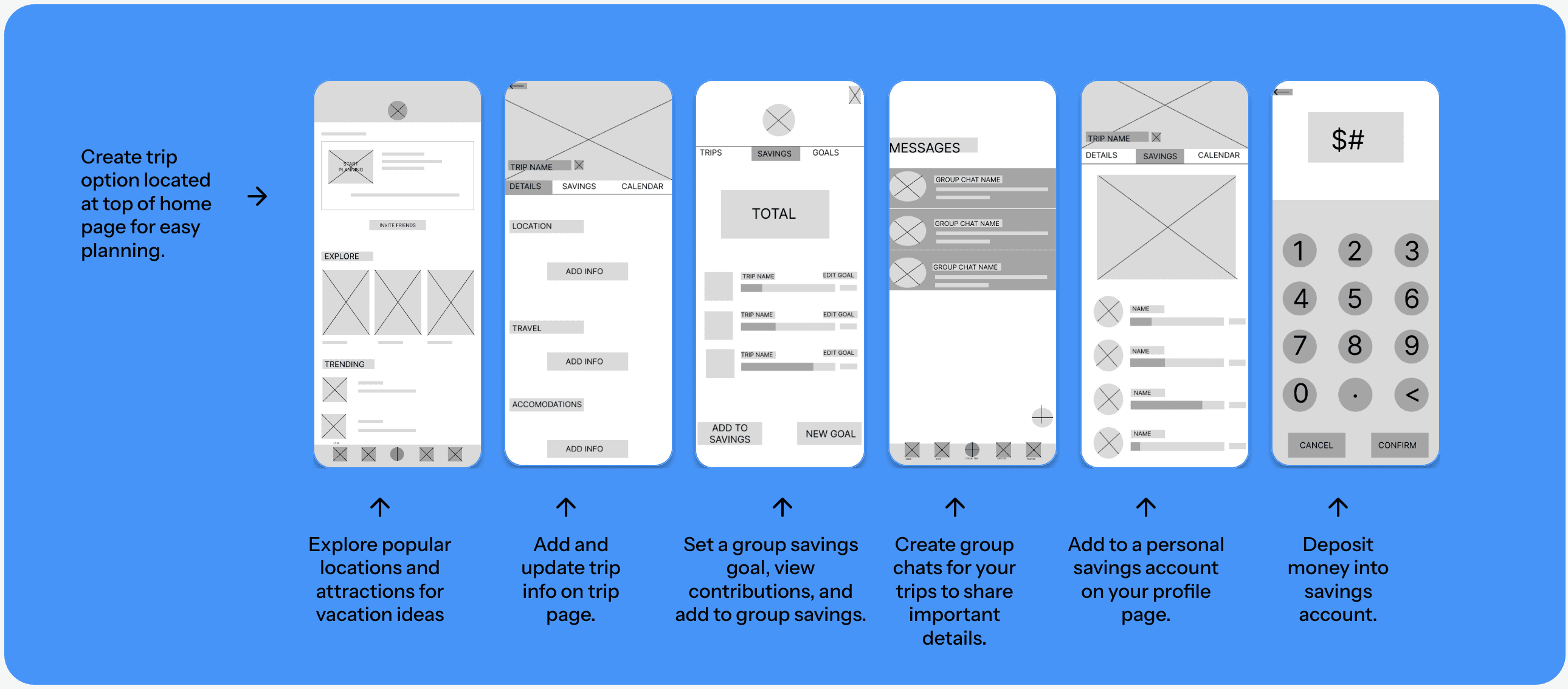
Create trip option located at top of home page for easy planning.
Explore popular locations and attractions for vacation ideas
Add and update trip info on trip page.
Add to a personal savings account on your profile page.
Create group chats for your trips to share important details.
Deposit money into savings account.
Set a group savings goal, view contributions, and add to group savings.
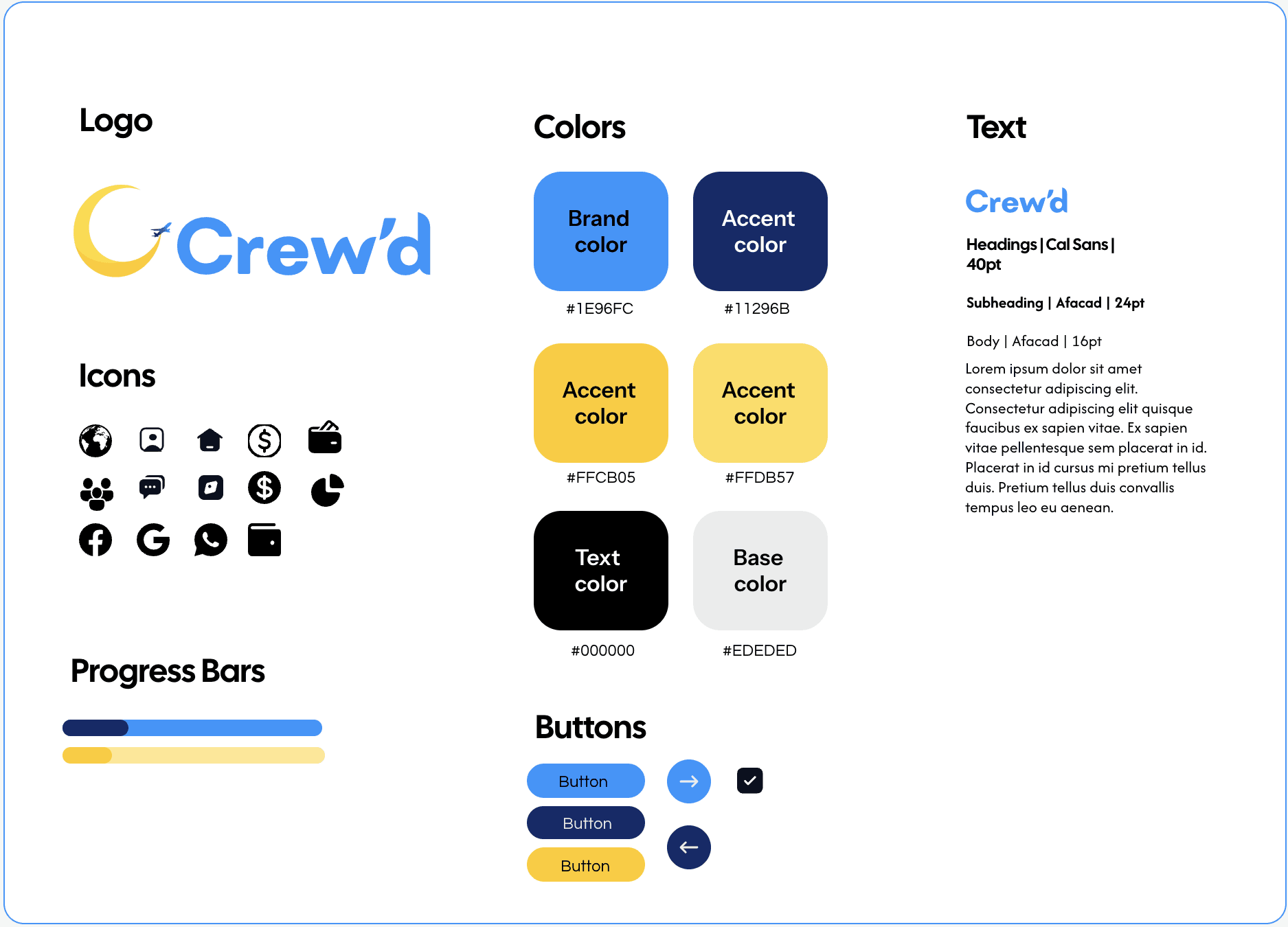
Accent
color
Brand
color
#1E96FC
#11296B
#FFCB05
#FFDB57
#000000
#EDEDED
Button
Button
Button
Crew’d
Crew’d

Lorem ipsum dolor sit amet consectetur adipiscing elit. Consectetur adipiscing elit quisque faucibus ex sapien vitae. Ex sapien vitae pellentesque sem placerat in id. Placerat in id cursus mi pretium tellus duis. Pretium tellus duis convallis tempus leo eu aenean.
Headings | Cal Sans | 40pt
Body | Afacad | 16pt
Subheading | Afacad | 24pt
Base
color
Text
color
Accent
color
Accent
color
Colors
Icons
Buttons
Text
Logo
Progress Bars
Primary color: blue
Reason: blue is generally seen as calming and trustworthy, which felt very fitting since this app focuses on traveling and finance.
Secondary color: yellow
Reason: the yellow accent pairs nicely with the blue and adds energy and life to the overall design without overwhelming it.
Branding
High Fidelity Mockups
High Fidelity Mockups
High Fidelity Mockups
High Fidelity Prototypes
High Fidelity Prototypes
Blue and yellow are generally considered to be more color-blind accessible, which was important to me. However, it was still a challenge because yellow on certain backgrounds, like white or grey, can be difficult for some users to see clearly.
The best solution was to use blue and yellow strategically. Especially for specific buttons and key elements. This way, users with color blindness can better differentiate between the background and important information, while still keeping everything clear and easy to read for all other users.
Accessibility Concerns
User Journey
User Journey
User Journey
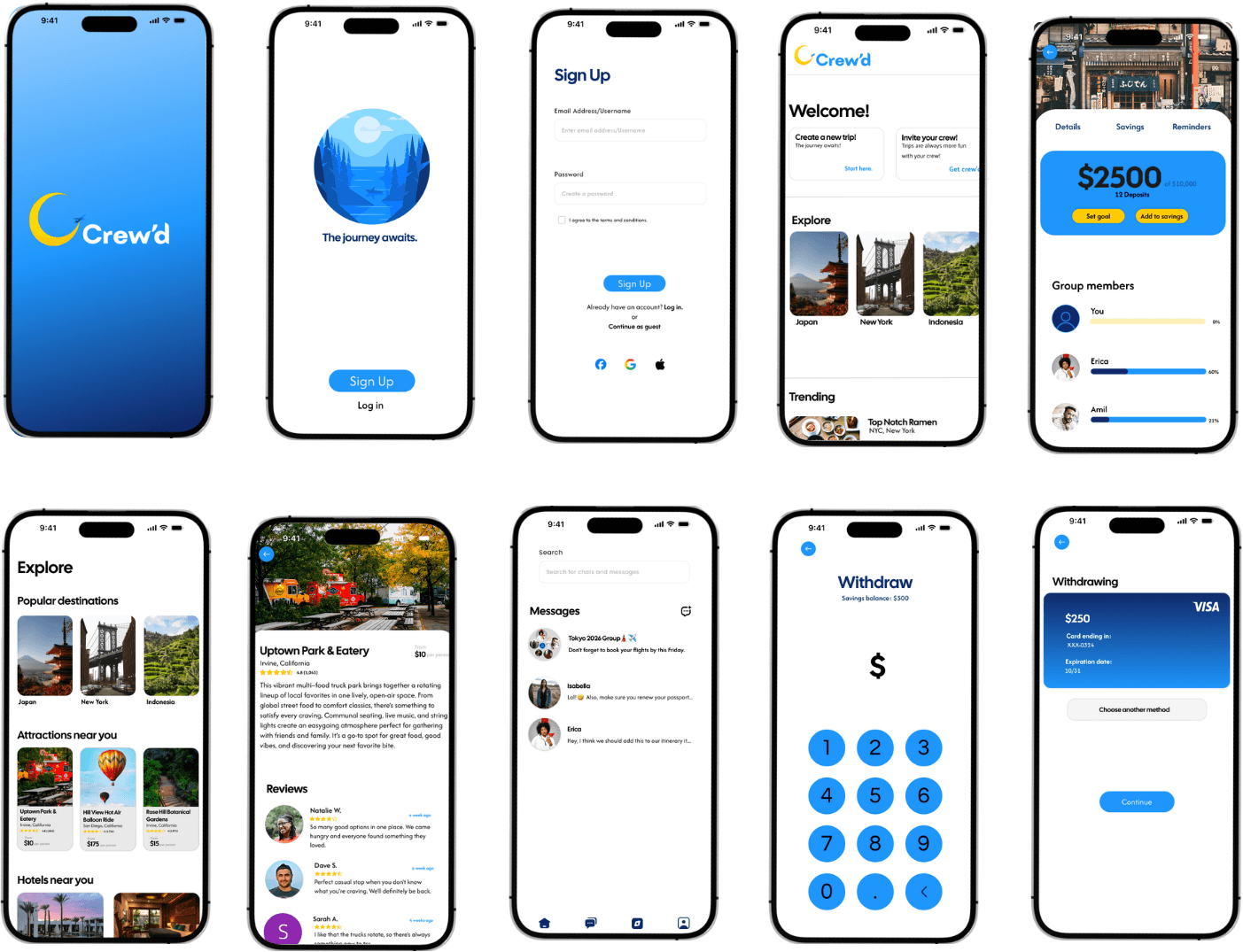
All you need, in one place. View your trip details including flight and hotel information, add towards a group savings goal, and check reminders.
Explore locally and internationally trending cities and attractions. View reviews and get a price estimate for places you might be interested in.
Create a group chat and message your crew in app. Send direct messages to keep your crew members updated.
"It's always just time (the challenge), the timing is everything. And of course money." - S.G.
"It's always just time (the challenge), the timing is everything. And of course money." - S.G.
User Pain Points
User Pain Points
User Pain Points
All you need, in one place. View your trip details including flight and hotel information, add towards a group savings goal, and check reminders.
Create a group chat and message your crew in app. Send direct messages to keep your crew members updated.
40%
80%
80%
Primary color: blue
Reason: blue is generally seen as calming and trustworthy, which felt very fitting since this app focuses on traveling and finance.
Secondary color: yellow
Reason: the yellow accent pairs nicely with the blue and adds energy and life to the overall design without overwhelming it.
Branding
Explore locally and internationally trending cities and attractions. View reviews and get a price estimate for places you might be interested in.
Timeline
8 Weeks
Skills
Mobile App Design
Digital Design
User Research
Role
UX Designer
UX Researcher
Competitive Analysis
Competitive Analysis
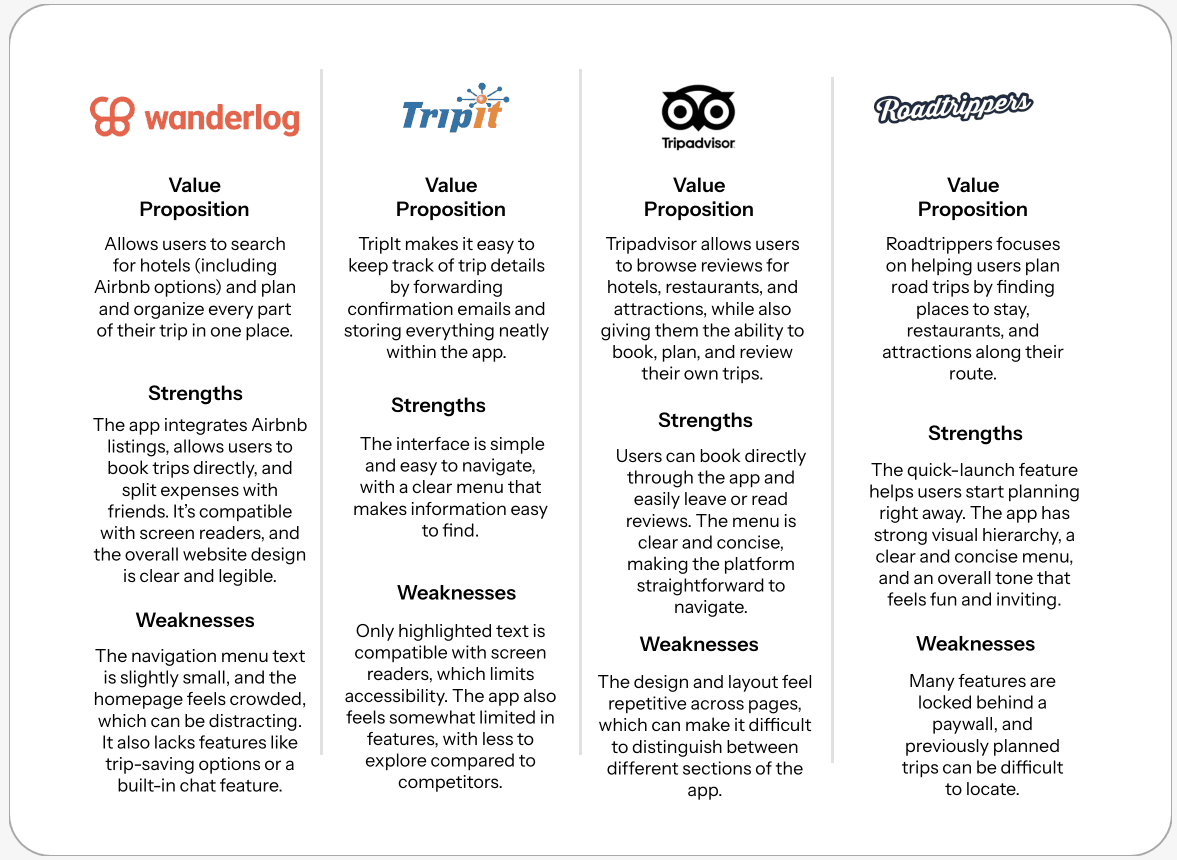
After analyzing four trip-planning apps, I found that while they support itinerary building and attraction discovery, they lack a key feature: collaborative trip planning and shared saving.
After analyzing four trip-planning apps, I found that while they support itinerary building and attraction discovery, they lack a key feature: collaborative trip planning and shared saving.
Value Proposition
Allows users to search for hotels (including Airbnb options) and plan and organize every part of their trip in one place.
The app integrates Airbnb listings, allows users to book trips directly, and split expenses with friends. It’s compatible with screen readers, and the overall website design is clear and legible.
Strengths
The navigation menu text is slightly small, and the homepage feels crowded, which can be distracting. It also lacks features like trip-saving options or a built-in chat feature.
Weaknesses
Strengths
The interface is simple and easy to navigate, with a clear menu that makes information easy to find.
Only highlighted text is compatible with screen readers, which limits accessibility. The app also feels somewhat limited in features, with less to explore compared to competitors.
Weaknesses
TripIt makes it easy to keep track of trip details by forwarding confirmation emails and storing everything neatly within the app.




Strengths
Users can book directly through the app and easily leave or read reviews. The menu is clear and concise, making the platform straightforward to navigate.
The design and layout feel repetitive across pages, which can make it difficult to distinguish between different sections of the app.
Weaknesses
Tripadvisor allows users to browse reviews for hotels, restaurants, and attractions, while also giving them the ability to book, plan, and review their own trips.
Weaknesses
Many features are locked behind a paywall, and previously planned trips can be difficult to locate.
Value Proposition
Roadtrippers focuses on helping users plan road trips by finding places to stay, restaurants, and attractions along their route.
The quick-launch feature helps users start planning right away. The app has strong visual hierarchy, a clear and concise menu, and an overall tone that feels fun and inviting.
Strengths
Value Proposition
Value Proposition
What do our users need most?
Findings
Findings
View final prototype
Finances
Planning
Competitive Analysis
Timeline
Role
UX Designer
UX Researcher
8 Weeks
Skills
Mobile App Design
Digital Design
User Research
Crew’d is a collaborative trip planning and savings app designed to simplify the group travel experience. The app allows users to create shared savings goals with their travel crew, track individual contributions, and stay accountable as a group.
Beyond budgeting, Crew’d centralizes key trip details in one place by organizing trip details, deadlines, and to-do lists—so nothing gets overlooked. By combining financial planning with trip coordination, Crew’d reduces the stress of group travel and helps users stay aligned, organized, and on track from the early planning stages to departure.
Usability Testing
How might we?
How might we?
The Solution
How might we make it easier for users to collaboratively plan and save so that we can reduce the stress and frustration of trip planning.
A trip planning app that works both as an organizer and as a way to save money, it prioritizes group trips by allowing you to collaborate on planning trips and saving towards a collective goal.
View final prototype
Next steps
I plan to continue refining the design and conducting more testing to uncover potential pain points in the user flow. This will help me better understand what makes a truly effective and intuitive user interaction.
Lessons learned
Next steps
This process was extremely rewarding and taught me a lot about the design process. As I iterated, I changed my design many times, which helped me realize that less is more. I also learned that good design isn’t just about aesthetics; it’s about functionality and creating a thoughtful, seamless user experience.
View final prototype
A trip planning app that works both as an organizer and as a way to save money, it prioritizes group trips by allowing you to collaborate on planning trips and saving towards a collective goal.
How might we?
How might we make it easier for users to collaboratively plan and save so that we can reduce the stress and frustration of trip planning.
The Solution
Designing with the user in mind…
I plan to continue refining the design and conducting more testing to uncover potential pain points in the user flow. This will help me better understand what makes a truly effective and intuitive user interaction.
Next steps
Lessons learned
This process was extremely rewarding and taught me a lot about the design process. As I iterated, I changed my design many times, which helped me realize that less is more. I also learned that good design isn’t just about aesthetics; it’s about functionality and creating a thoughtful, seamless user experience.
Designing with the user in mind…
Before
After
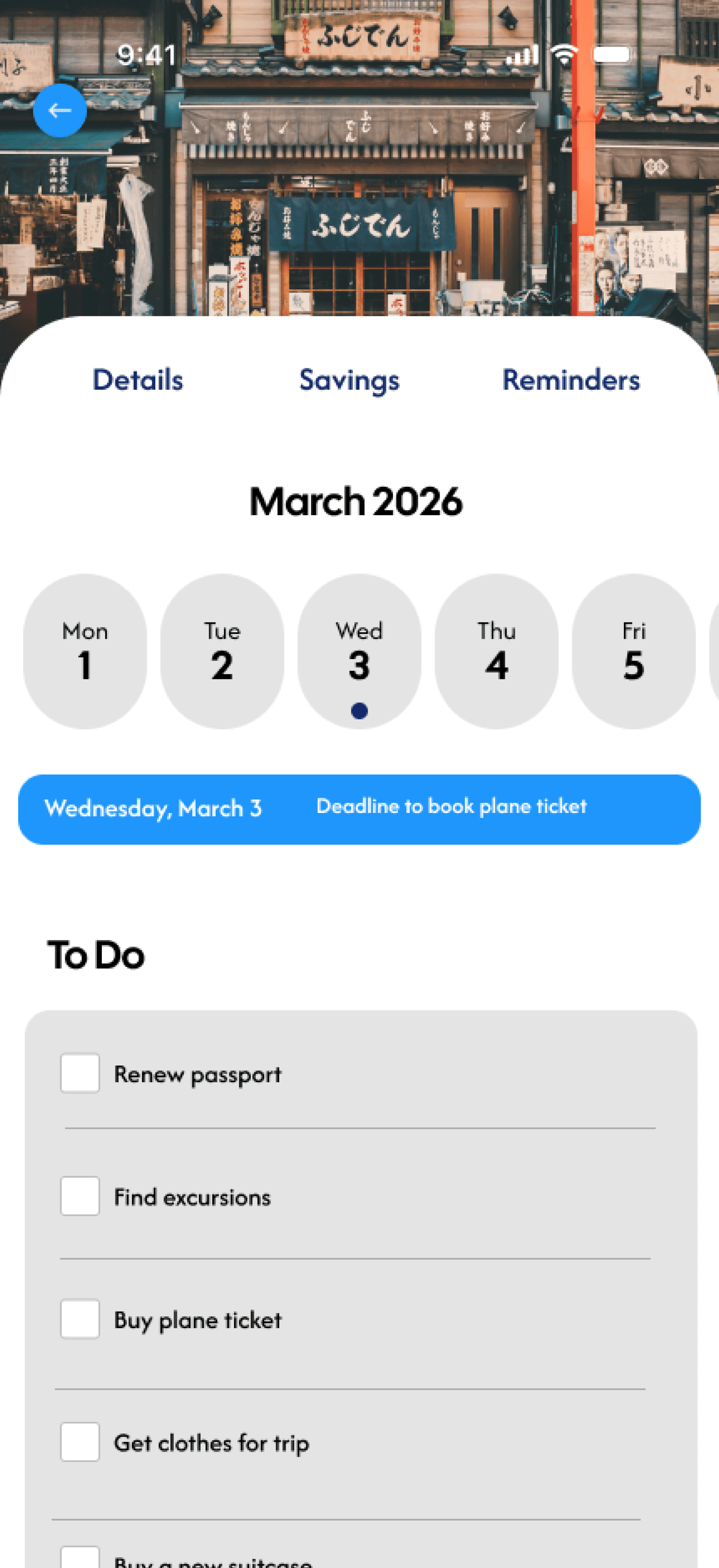
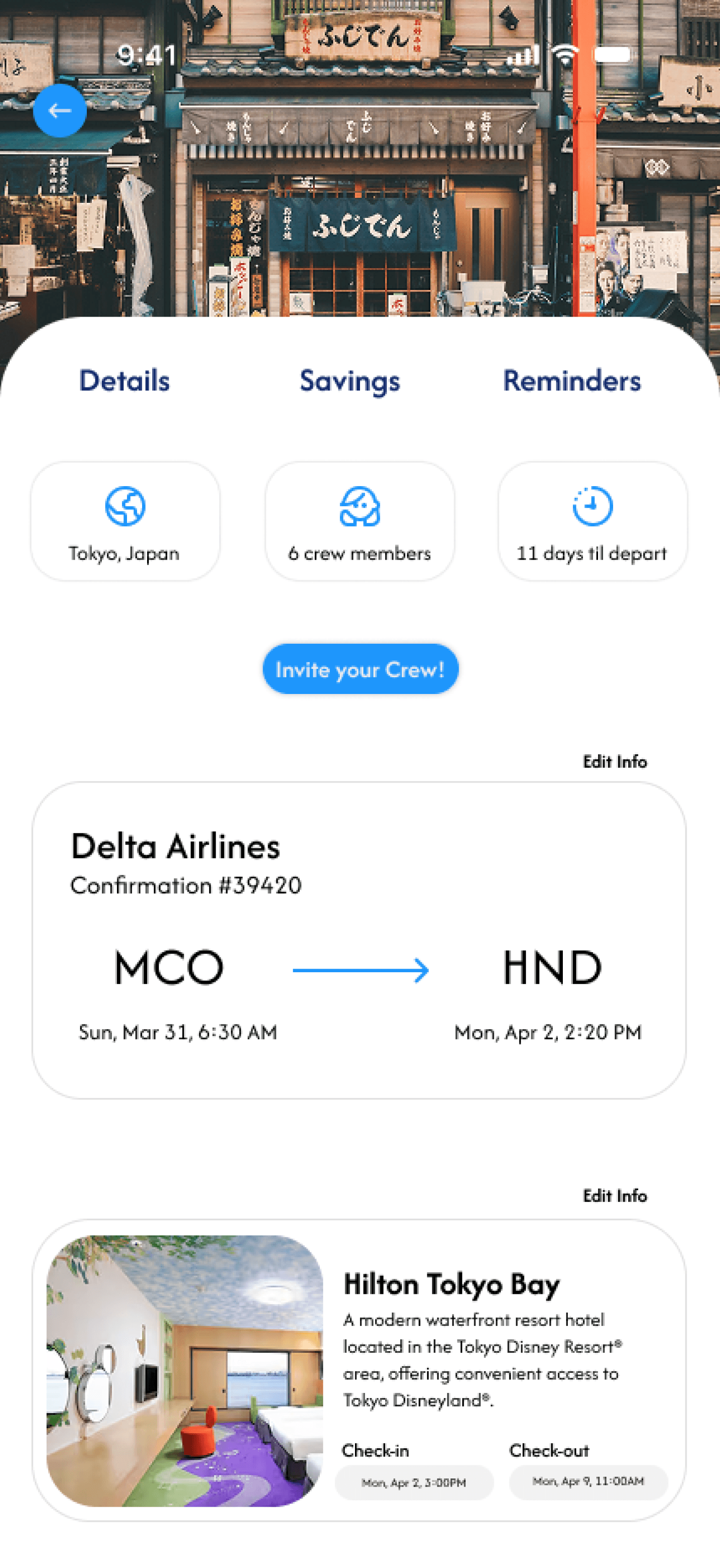
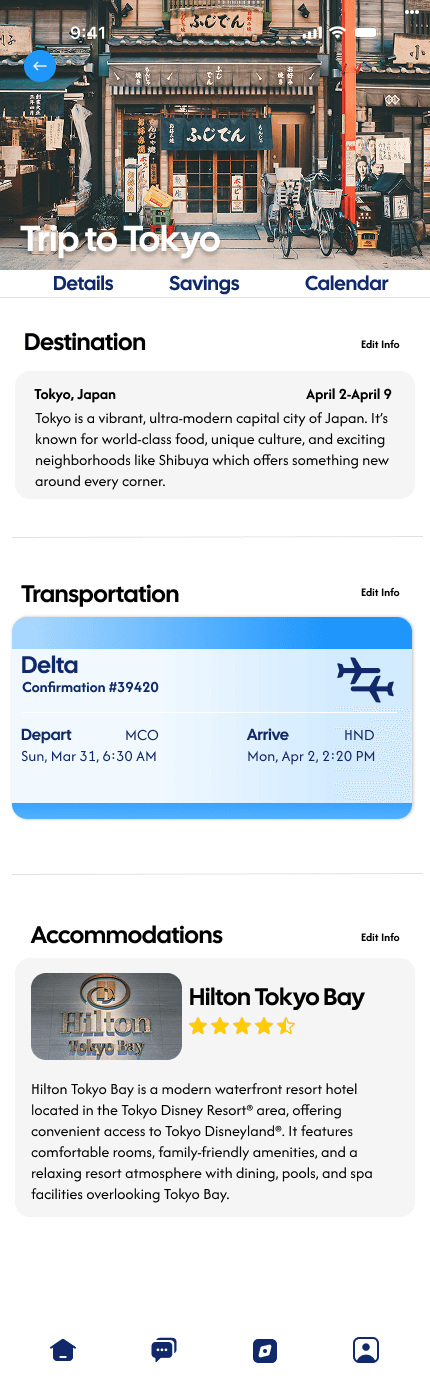
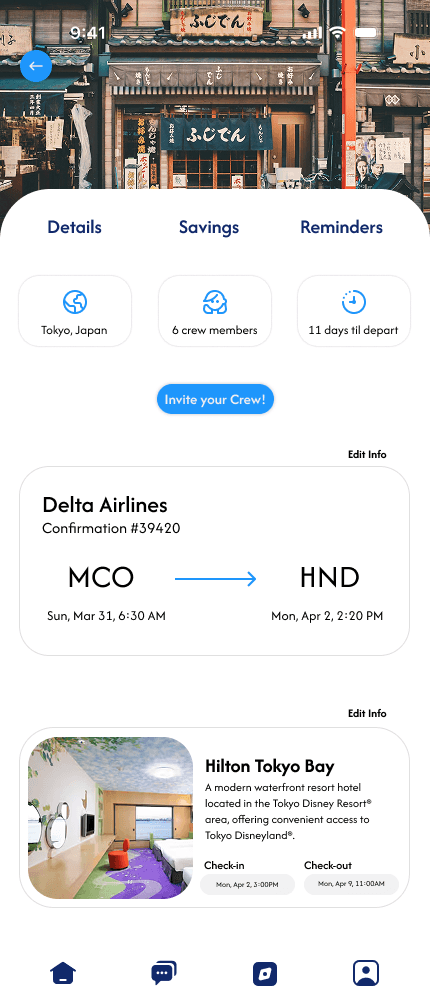
Reorganized the layout to surface important trip details at the top of the page for quicker access.
Simplified the overall design by reducing color usage and using cleaner, more readable typography.
Added clear checkout and check-in dates for the hotel to improve clarity and usability
Iterations
Reorganized the layout to surface important trip details at the top of the page for quicker access.
Simplified the overall design by reducing color usage and using cleaner, more readable typography.
Added clear checkout and check-in dates for the hotel to improve clarity and usability
Before
After
Iterations
Blue and yellow are generally considered to be more color-blind accessible, which was important to me. However, it was still a challenge because yellow on certain backgrounds, like white or grey, can be difficult for some users to see clearly.
The best solution was to use blue and yellow strategically. Especially for specific buttons and key elements. This way, users with color blindness can better differentiate between the background and important information, while still keeping everything clear and easy to read for all other users.
Accessibility Concerns
Finding an affordable location, and booking everything is especially difficult. It's also hard to keep everyone updated and organized during trip planning.
Finding time to plan and go on vacation was difficult. Especially in a large group where there are so many different schedules.
Saving and organizing savings in a group can be frustrating and confusing. It’s hard to keep track of expenses and the contributions everyone should make.
Iterations
Before
After
Reorganized the layout to surface important trip details at the top of the page for quicker access.
Simplified the overall design by reducing color usage and using cleaner, more readable typography.
Added clear checkout and check-in dates for the hotel to improve clarity and usability
I conducted usability testing during the low-fidelity prototype stage to focus on validating the app’s user flow. Given the number of pages and features, ensuring a clear and intuitive flow was a priority. Testing at this stage allowed me to identify navigation and flow issues early, making the design process more time-efficient before moving into high-fidelity designs.
I interviewed 5 people, giving them a set of tasks to complete. With their feedback I identified 3 common themes that users struggled with:
"It's always just time (the challenge), the timing is everything. And of course money." - S.G.
After analyzing four trip-planning apps, I found that while they support itinerary building and attraction discovery, they lack a key feature: collaborative trip planning and shared saving.
Create a group chat and message your crew in app. Send direct messages to keep your crew members updated.
All you need, in one place. View your trip details including flight and hotel information, add towards a group savings goal, and check reminders.
Had difficulty locating the personal savings page, suggesting that personal and group savings pathways lack clear visibility and distinction.
80%
Struggled with overall navigation, revealing usability issues in the app’s information architecture.
80%
Identified the interface as buggy, indicating friction points within the core user flow.
40%
Time
Planning
Finances
Finding time to plan and go on vacation was difficult. Especially in a large group where there are so many different schedules.
Saving and organizing savings in a group can be frustrating and confusing. It’s hard to keep track of expenses and the contributions everyone should make.
Blue and yellow are generally considered to be more color-blind accessible, which was important to me. However, it was still a challenge because yellow on certain backgrounds, like white or grey, can be difficult for some users to see clearly.
The best solution was to use blue and yellow strategically. Especially for specific buttons and key elements. This way, users with color blindness can better differentiate between the background and important information, while still keeping everything clear and easy to read for all other users.
Accessibility Concerns
Finding an affordable location, and booking everything is especially difficult. It's also hard to keep everyone updated and organized during trip planning.
Branding
High Fidelity Prototypes
What do our users need most?
Designing with the user in mind…
Primary color: blue
Reason: blue is generally seen as calming and trustworthy, which felt very fitting since this app focuses on traveling and finance.
Secondary color: yellow
Reason: the yellow accent pairs nicely with the blue and adds energy and life to the overall design without overwhelming it.
Time
Explore locally and internationally trending cities and attractions. View reviews and get a price estimate for places you might be interested in.